
When the Graduated Circles visualization is selected, locations are displayed as circles whose size and color represent aggregated values, making it easy to compare relative magnitude across the map.
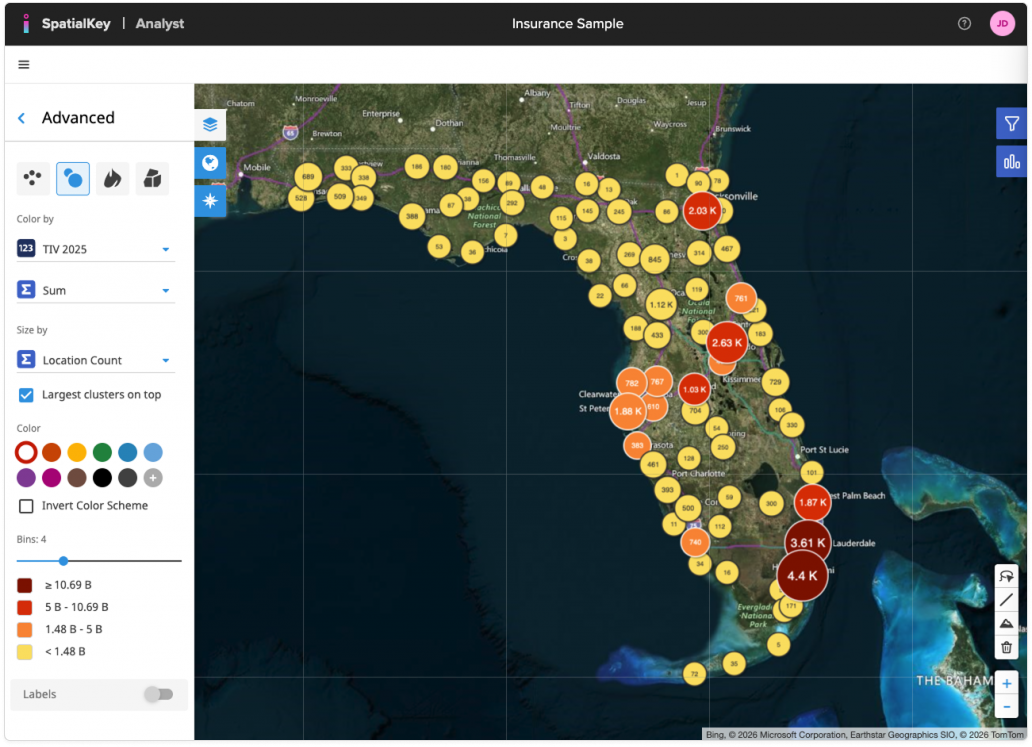
From the Advanced panel, you can configure the following options:
- Color by: Choose a numeric field from your data.
- Aggregation (Σ Sum, Avg, Min, Max): Choose how values are aggregated when multiple locations fall near each other. Using Sum rolls up values to show total of the column selected within each circle.
- Size by: Control what drives the circle size (for example, a location count or another numeric field). Larger circles indicate higher values, helping major concentrations stand out visually.
- Largest clusters on top: Enable this option to draw the largest circles above smaller ones, preventing key clusters from being hidden in dense areas.
- Color & Color Scheme: Pick a color palette for the bins, invert the color scheme if needed, or apply a single color for a more simplified view.
- Bins: Adjust the number of bins to control how finely values are grouped. The displayed ranges update automatically as you change the bin count.
Learn more about Color Settings & Bins.
Graduated Circles are ideal for understanding relative scale and concentration at a glance, especially when analyzing totals, accumulations, or clustered exposure patterns.
Graduated Circles is just one way of visualizing your data on a map. In SpatialKey, we offer the following geographic visualization options – heat maps, graduated circles, individual points and thematic maps.
Was this helpful?
Thanks for your feedback!