
The options discussed in this section need to be configured by each individual underwriter.
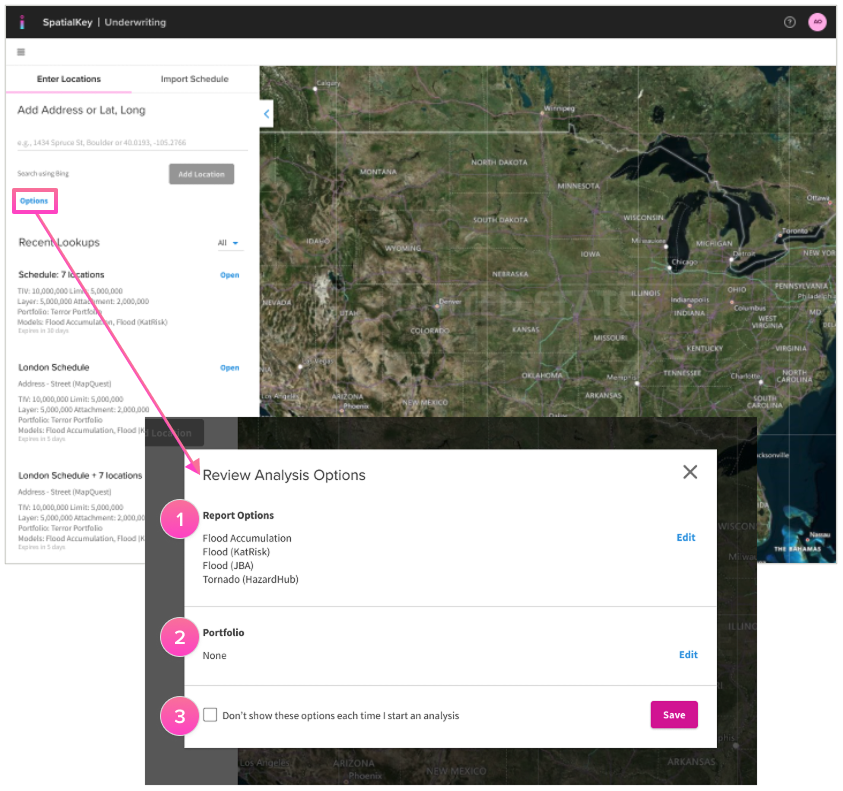
1. Hazards and models listed in the report options section will be run with the analysis. Customization of these options is likely done once initially and then on an as-needed basis going forward. Click “edit” to select and deselect hazards and models.
This option allows underwriting teams to focus on what matters for their analysis (e.g. terror underwriters vs. Florida homeowner underwriters). It can also save your organization money for models that are transactional based, allowing underwriters to turn them on only when needed.
2. Select an in-force portfolio and peril to be used in any accumulation analyses enabled for your organization. Accumulation analyses at the point of underwriting allow underwriters to perform aggregate checks before quoting or binding a policy.
When an in-force portfolio is identified, it will be used for all ground up, gross and net calculations within each accumulation analysis result. Portfolios are configurable by individual underwriters to provide flexibility within an organization where different business units manage to a different in-force portfolio.
3. If an underwriter doesn’t anticipate changing report options or the selected in-force portfolio between analyses, they can check the “Don’t show these options each time I start an analysis” box to bypass this screen for following analyses.
TIP! Build a complete view of risk, spanning multiple hazards—like flood, wildfire, hurricane, and more—with data from dozens of providers.
Was this helpful?