
SpatialKey has come a long way since its early days. Originally, many of its applications—including the widely used Map Analyst—were built using Adobe Flash technology. Flash was once a popular choice for interactive web applications, but as browsers phased out support for Flash, SpatialKey faced the challenge of modernizing its platform.
The Migration to HTML
To ensure a future-proof and user-friendly experience, SpatialKey migrated nearly all of its features to modern HTML-based applications. These new applications run entirely in the browser, eliminating the need for outdated plugins and offering improved performance, security, and compatibility across devices.
The primary replacement for Map Analyst is the Analyst application. Analyst delivers most of the functionality users relied on in Map Analyst, with a few exceptions for advanced features. The SpatialKey team has a clear roadmap to bring those advanced capabilities into Analyst over time, ensuring continuous improvement and innovation.
Legacy Applications and Desktop Client
While the transition to HTML is nearly complete, some customers still use older applications that were originally Flash-based. To accommodate these users, SpatialKey converted those apps into a downloadable desktop application called SpatialKey Client for Windows. This lightweight client allows legacy apps like Map Analyst and Hazard Analyst to run outside the browser.
Here’s what you need to know:
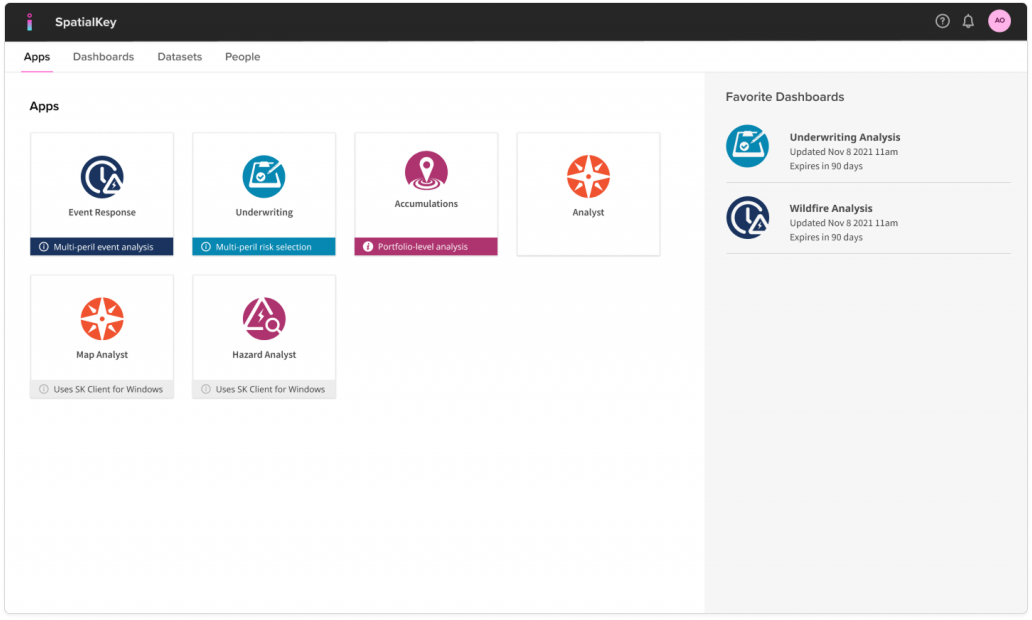
- Installation: Users are prompted to download and install SpatialKey Client for Windows the first time they access an app labeled “Uses SpatialKey Client for Windows.”
- Supported Apps: Map Analyst and Hazard Analyst require the desktop client because they still rely on Flash technology.
- Browser Apps: Applications such as Analyst, Underwriting, Accumulations, and Event Response run directly in the browser and do not require the desktop client.
Important Note on Support
SpatialKey strongly recommends using the new HTML applications wherever possible. These applications are actively supported and continuously updated. In contrast, the desktop client and legacy apps receive no updates or support. They remain available only for customers who need time to transition.
Looking Ahead
The future of SpatialKey is firmly rooted in HTML. Analyst is the modern solution for mapping and analysis, and it will continue to evolve with new features and enhancements. By adopting the HTML applications now, users can take advantage of ongoing improvements and ensure compatibility with current and future technologies.
Was this helpful?