
When the Heatmap visualization is selected, SpatialKey displays a continuous gradient that highlights areas of higher and lower concentration rather than individual locations. This view is ideal for spotting hotspots and overall spatial patterns.
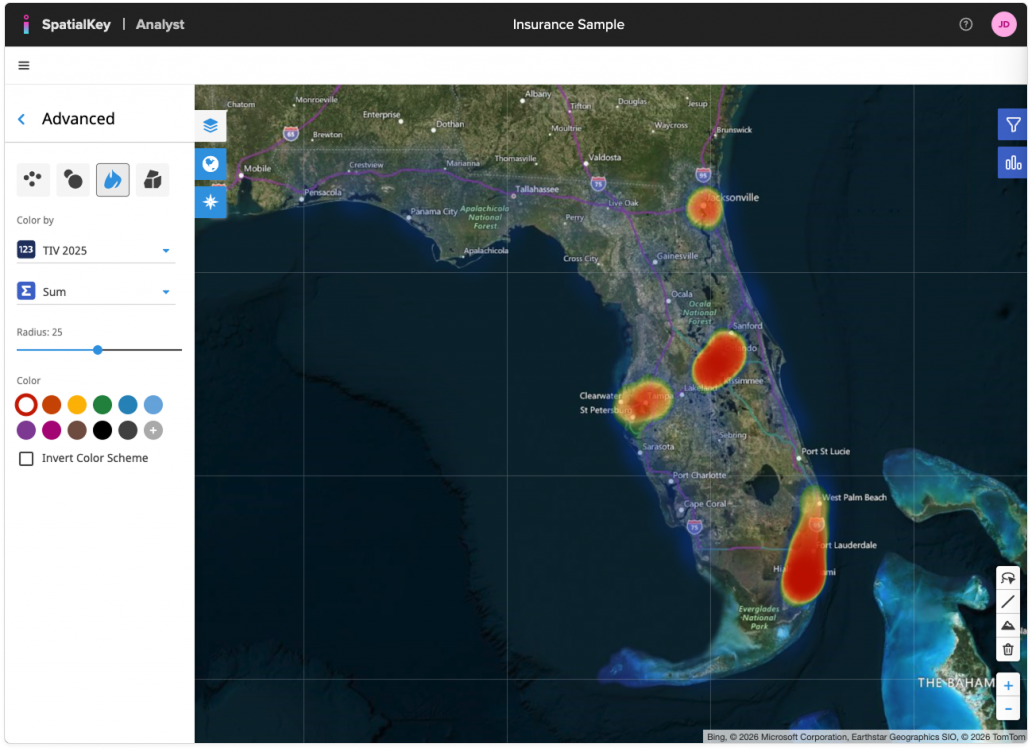
From the Advanced panel, you can configure these options:
- Color by: Choose a numeric field to drive the heat intensity. Heatmaps require numeric data and do not use bins.
- Aggregation (Σ Sum, Avg, Min, Max): Choose how values are aggregated when multiple locations fall near each other. Using Sum aggregates values to show total intensity within an area.
- Radius: Adjust the radius slider to control how far each location’s influence spreads. Larger radius values create smoother, broader heat areas, while smaller values produce tighter, more localized hotspots.
- Color & Gradient Palette: Choose the color palette used for the heatmap gradient. Colors blend smoothly to represent continuous changes in intensity rather than discrete categories.
- Invert Color Scheme: Optionally reverse the gradient to emphasize low versus high values differently.
Learn more about Color Settings & Bins.
Heatmaps use a gradient-based approach instead of binning, making them especially useful for visualizing density, exposure concentration, and spatial trends at a regional or portfolio level.
Heatmaps are just one way of visualizing your data on a map. In SpatialKey, we offer the following geographic visualization options – heat maps, graduated circles, individual points and thematic maps.
Was this helpful?
Thanks for your feedback!